

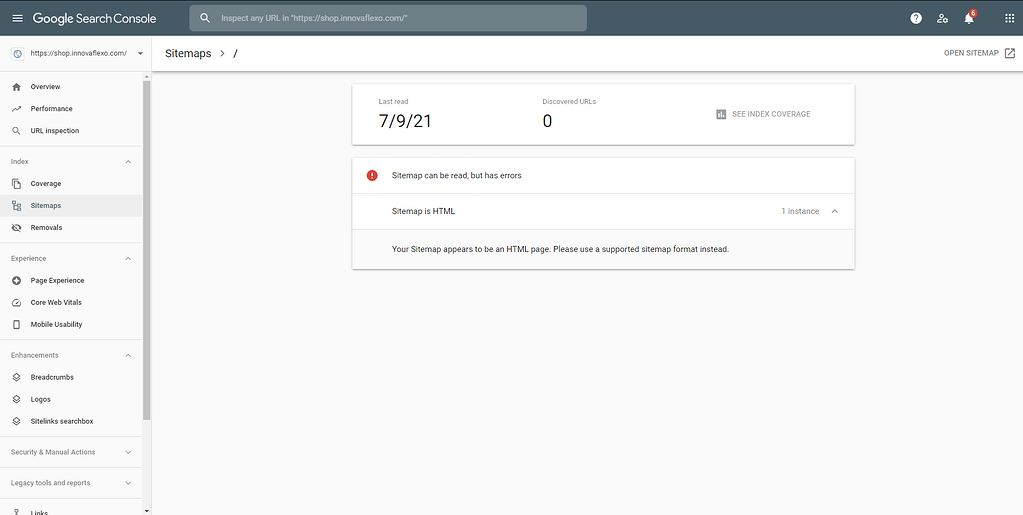
No Referring Sitemaps Detected is a common message that website owners see when using the URL Inspection tool in Google Search Console. Many people assume this notification means there is a serious technical SEO problem, but that is not always true. In most cases, it simply tells you that Google discovered the URL through another method instead of finding it through your submitted XML sitemap.
Understanding how Google discovers web pages is important for maintaining a healthy website. Search engines can find URLs through many sources, including internal links, external backlinks, and sitemap files. When you see no referring sitemaps detected, it means Google knows about the page but does not have a record showing that the sitemap was the source of discovery. This information can help website owners better understand their crawling process.
What Does No Referring Sitemaps Detected Mean?
No Referring Sitemaps Detected means that Google Search Console did not identify a sitemap as the method used to discover a specific webpage. When Google crawls websites, it collects information about how pages are found. If a URL is discovered through an internal link from another page or through an external website link, Google may show this message during URL inspection.
This notification does not automatically indicate that your sitemap is broken or that your page cannot rank in search results. Google has several ways to discover content, and a sitemap is only one method. A properly optimized website with strong internal linking can still allow Google to find and index pages even when a referring sitemap is not detected.
Why Does Google Show No Referring Sitemaps Detected?
There are several reasons why Google Search Console may display this message. One of the most common reasons is that Google discovered the page naturally while crawling your website. For example, if another article on your website links to a new page, Google may follow that link and find the content before processing your sitemap information.
Another possible reason is that your sitemap was updated after Google already discovered the URL. Search engines continuously crawl websites, and their systems may discover pages at different times through different signals. In some cases, Google may find a page through external backlinks, website navigation, or other crawling methods before connecting it with your XML sitemap.
Is No Referring Sitemaps Detected an Error?
Many website owners worry when they see this message because the wording sounds like a warning. However, No Referring Sitemaps Detected is usually not considered a critical error in Google Search Console. It is mainly an informational message that explains how Google found a URL rather than a notification that something is wrong with your website.
A real SEO problem usually involves issues such as pages not being indexed, blocked crawling, incorrect robots.txt settings, or technical website errors. If your page is indexed and performing well in search results, this message does not require immediate action. Website owners should focus on overall SEO health instead of treating every Search Console message as a problem.
How to Check Your Sitemap Status in Google Search Console
Checking your sitemap status is an important step when investigating URL discovery issues. Website owners can open Google Search Console and access the Sitemaps section to review submitted XML sitemap files. This report provides details about whether Google successfully processed your sitemap and whether there were any reported problems.
A properly working sitemap should include important website pages that you want Google to discover and understand. If you notice that specific URLs are missing, you can review your website settings, SEO plugins, or sitemap configuration. Keeping your sitemap updated helps search engines better understand your website structure and content organization.
How to Fix No Referring Sitemaps Detected in Google Search Console
Although this message is not always a problem, some website owners may want Google to recognize their sitemap as a discovery source. The first step is checking whether the URL actually exists inside your XML sitemap. If the page is missing, update your sitemap settings or adjust your SEO plugin configuration to include the required URL.
Another solution is submitting your sitemap again through Google Search Console. This can encourage Google to review the latest version of your sitemap file. Website owners should also improve internal linking, remove accidental noindex tags, and make sure important pages are accessible to search engine crawlers. These actions support better discovery and indexing.
How Sitemaps Help Google Crawl and Index Websites
XML sitemaps are an important part of technical SEO because they provide search engines with a structured list of website pages. They help Google understand which URLs exist, which pages are important, and when content has been updated. While a sitemap does not guarantee that every page will appear in search results, it improves the chances of efficient discovery.
For large websites with thousands of pages, sitemaps become even more valuable. They help search engines navigate complex website structures and identify important content faster. However, sitemaps work best when combined with quality content, proper internal linking, and strong technical optimization. A complete SEO strategy uses multiple methods to help Google understand a website.
Common Sitemap Problems That Can Affect Website Discovery

Although No Referring Sitemaps Detected is generally harmless, other sitemap problems can create real SEO challenges. Common sitemap issues include invalid XML formatting, blocked URLs, incorrect page addresses, outdated sitemap files, and including pages that should not be indexed. These problems can make it harder for search engines to properly understand website content.
Regular sitemap monitoring helps website owners identify and fix these problems before they affect visibility. Removing broken URLs, updating outdated pages, and ensuring important content appears correctly in the sitemap can improve crawling efficiency. A clean and accurate sitemap provides better communication between your website and search engines.
Best Practices to Improve Sitemap and Indexing Performance
Maintaining a strong sitemap requires consistent attention and proper website management. Website owners should regularly review their sitemap files, remove unnecessary URLs, and make sure only valuable pages are included. A well-organized sitemap helps Google focus on important content rather than wasting crawling resources on unnecessary pages.
Strong internal linking is another important practice for improving website discovery. Google uses links to understand relationships between pages and identify valuable content. Combining an updated sitemap with a logical website structure creates a stronger foundation for SEO success. Regularly reviewing Google Search Console reports can also help detect technical issues early.
Understanding the Difference Between Sitemap Discovery and Indexing
One common misunderstanding is confusing sitemap discovery with indexing. Sitemap discovery simply means Google found information about a URL through an XML sitemap. Indexing means Google has analyzed the page and decided to store it in its search database. A page can be discovered without being indexed, and it can also be discovered through methods other than a sitemap.
This difference explains why No Referring Sitemaps Detected does not automatically indicate an indexing problem. Website owners should check the actual indexing status of their pages before making changes. Understanding these processes allows SEO professionals and website managers to make better technical decisions.
Conclusion
No Referring Sitemaps Detected is usually a simple informational message that explains how Google discovered a webpage. It does not mean your website has failed, your sitemap is broken, or your rankings will automatically decrease. Google uses many discovery methods, and sitemap references are only one part of the crawling process.
Maintaining a healthy website requires proper sitemap management, strong internal linking, quality content, and regular monitoring through Google Search Console. By understanding what this message means and when action is necessary, website owners can avoid unnecessary changes and focus on improving their overall SEO performance.
FAQs
What Does No Referring Sitemaps Detected Mean?
It means Google found your URL but did not discover it through your submitted XML sitemap.
Is No Referring Sitemaps Detected Bad for SEO?
No, this message alone does not negatively affect SEO rankings or website performance.
Should I Fix No Referring Sitemaps Detected?
Usually, no action is required unless the page is not indexed or you notice other technical SEO problems.
How Can I Make Google Find My URL Through a Sitemap?
You can add the URL to your XML sitemap, submit the sitemap in Google Search Console, and ensure your sitemap is updated.
Can Google Index Pages Without a Sitemap?
Yes, Google can discover pages through internal links, backlinks, and other crawling methods.
Why Is My Page Not Showing in My Sitemap?
Your page may be missing because of sitemap settings, SEO plugin rules, noindex tags, or website configuration issues.
Does Resubmitting a Sitemap Fix This Message?
Resubmitting may help Google review updated sitemap information, but it is not always necessary.
What Is the Purpose of an XML Sitemap?
An XML sitemap helps search engines discover important website pages and understand website structure.
How Often Should I Check Google Search Console?
Regular monitoring helps identify indexing, crawling, and technical SEO issues before they become serious.
Is No Referring Sitemaps Detected Common?
Yes, many website owners see this message because Google often discovers URLs through sources other than sitemaps.
You May Also Read: DotGothic16