

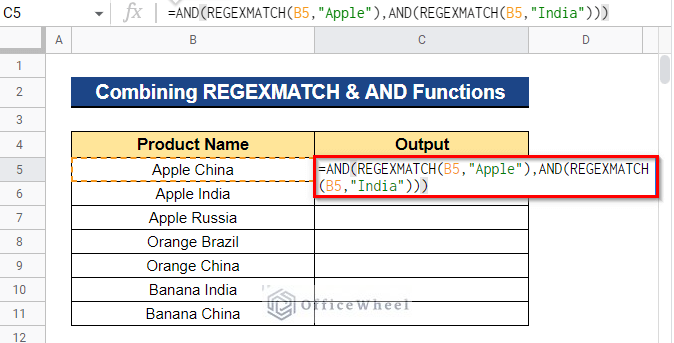
Managing spreadsheet data becomes more challenging as files grow larger and contain thousands of rows of information. Users often need to search for text patterns, validate entries, or organize information quickly without spending hours on manual work. This is where Google Sheets REGEXMATCH becomes useful because it provides an efficient method for finding specific patterns inside cells and datasets.
Businesses, marketers, students, and analysts rely on spreadsheet functions every day to simplify repetitive tasks. Instead of scanning rows one by one, users can apply formulas that instantly produce results. Learning Google Sheets REGEXMATCH can improve productivity, reduce mistakes, and help users automate text-based tasks with minimal effort and maximum accuracy.
Understanding Google Sheets REGEXMATCH
Google Sheets REGEXMATCH is a function designed to determine whether text matches a specific pattern. The function evaluates the content of a selected cell and compares it against a regular expression pattern. If the pattern exists, the result returns TRUE. If the pattern is not detected, the formula returns FALSE.
This function is particularly useful because it goes beyond simple text searching. Traditional search functions can locate exact words, but regex technology provides more flexibility. Users can search for letters, numbers, symbols, phrases, or combinations of text patterns using a single formula inside their spreadsheets.
How Google Sheets REGEXMATCH Works
The formula follows a straightforward structure that consists of text and a regular expression pattern. Users simply specify the target text and define what pattern the formula should locate. The function then checks the data and instantly displays whether the pattern matches the conditions.
For example, imagine managing customer records that contain names, phone numbers, or email addresses. Instead of checking every entry manually, Google Sheets REGEXMATCH can automatically identify records that meet specific criteria. This creates a faster workflow and allows users to focus on more important tasks rather than repetitive data review.
Understanding Regular Expressions in Google Sheets
Regular expressions, commonly known as regex, are sequences of characters that create search patterns. These patterns act as instructions that tell spreadsheets what type of content should be located. Learning a few basic regex symbols can significantly improve spreadsheet functionality and simplify complicated data processes.
Symbols such as periods, brackets, plus signs, and special characters each perform unique roles in pattern matching. For example, users can search for specific numbers, identify words beginning with particular letters, or detect exact text structures. Once these basic symbols become familiar, working with regex becomes easier and much more effective.
Common Examples and Practical Applications
Many users begin with simple tasks when learning regex functions. A common example includes searching for a specific word inside a sentence. Users may also need to verify whether cells contain numbers, dates, or certain phrases that match business requirements.
Google Sheets REGEXMATCH becomes even more valuable in professional environments. Marketing teams frequently use it to organize campaign data and identify keywords. Human resource departments may use pattern matching to validate contact information, while analysts can sort large datasets according to customized conditions.
Advanced Uses of Google Sheets REGEXMATCH
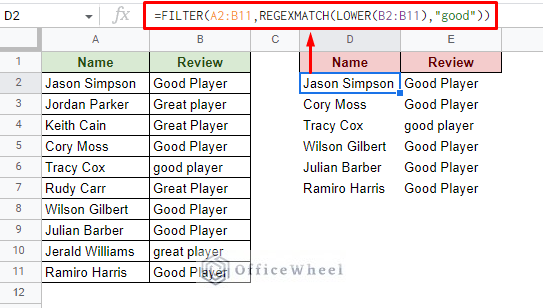
As users become comfortable with regex patterns, they often combine formulas to create more advanced automation. Functions such as IF, FILTER, and ARRAYFORMULA work well alongside regex functions and can generate more dynamic spreadsheets. These combinations help reduce repetitive work and create smarter data systems.
For example, Google Sheets REGEXMATCH can work with IF statements to produce custom outputs rather than basic TRUE or FALSE values. A spreadsheet may automatically display terms such as Approved, Valid Entry, or Review Needed depending on the pattern identified inside selected cells.
Related Functions That Work with REGEXMATCH
Google Sheets includes several additional functions that complement regex operations. Functions like REGEXEXTRACT and REGEXREPLACE perform different tasks while sharing similar pattern-based logic. Understanding how these functions interact can improve spreadsheet performance and provide more control over text management.
REGEXEXTRACT pulls matching content directly from text, while REGEXREPLACE modifies existing values based on specific patterns. Although each function serves a different purpose, combining them with Google Sheets REGEXMATCH can create powerful automation solutions for businesses and everyday users.
Common Mistakes and Troubleshooting Tips
Many beginners experience issues when using regex formulas for the first time because small syntax errors can affect results. Missing symbols, extra spaces, or incorrect character placement often prevent formulas from functioning correctly. Reviewing formula structures carefully can help eliminate these common problems.
Case sensitivity can also create confusion for many users. Some patterns distinguish between uppercase and lowercase letters, which may produce unexpected outcomes. Testing formulas on smaller data samples before applying them to larger spreadsheets helps ensure accuracy and reduces the chance of errors.
Best Practices for Better Spreadsheet Results
Simple patterns generally produce more reliable results than overly complex expressions. While regex offers flexibility, creating formulas with unnecessary conditions can make spreadsheets difficult to understand and maintain. Starting with basic patterns allows users to gradually build more advanced solutions over time.
Another useful practice involves organizing spreadsheet structures before applying formulas. Clean datasets and properly labeled columns improve efficiency and make troubleshooting easier. Taking a structured approach helps users gain maximum value from Google Sheets REGEXMATCH and improves overall workflow performance.
Conclusion
Modern spreadsheet management requires tools that can process information quickly and accurately. Google Sheets REGEXMATCH provides a practical solution for users who need to identify text patterns, validate information, and automate repetitive tasks. From simple searches to advanced automation, this function delivers significant benefits across many industries.
Learning regex techniques may initially seem challenging, but consistent practice quickly builds confidence. Once users understand pattern creation and formula combinations, spreadsheets become smarter and more efficient. Investing time in learning Google Sheets REGEXMATCH can improve productivity and transform the way data is managed.
FAQs
What does Google Sheets REGEXMATCH do?
Google Sheets REGEXMATCH checks whether text matches a specified regular expression pattern and returns TRUE or FALSE.
Is Google Sheets REGEXMATCH case-sensitive?
Yes, the function can be case-sensitive depending on the pattern being used.
Can Google Sheets REGEXMATCH perform partial matches?
Yes, users can create regex patterns that detect partial text matches inside larger strings.
Can I combine Google Sheets REGEXMATCH with IF functions?
Yes, combining these functions allows users to create custom outputs and advanced spreadsheet automation.
What is the difference between REGEXMATCH and REGEXEXTRACT?
REGEXMATCH checks if a pattern exists, while REGEXEXTRACT returns the matching content from the text.
You May Also Read: Cozumel Maps